How does the Salary Check work?

With the Salary Check, you can calculate what you earn according to your education collective labour agreement in a few steps. The tool is available for the collective labour agreements for the primary education (PO), secondary education (vo) en secondary vocational education (MBO)We update the data every year with the latest collective labor agreement arrangements, tax rates, and pension contributions.

1. Choose your education sector

Indicate whether you work in primary, secondary, or secondary vocational education. Based on your sector, the correct salary tables from the collective labor agreement will be loaded.

2. Fill in your details

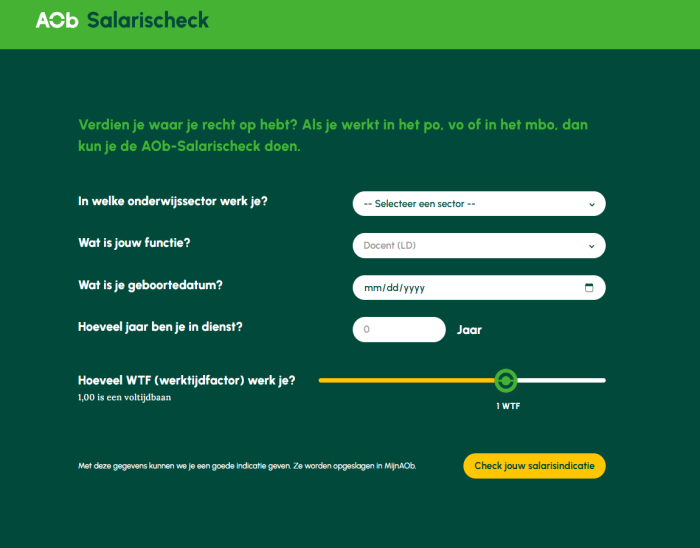
You enter your position / salary scale, age, the number of years you have worked, and working time factor.
Screenshot of the AOb Salary check

In the Salary Check, you enter your education sector, position / salary scale, age, number of years worked, and working time factor (FTF).


Go to the Salary Check

3. View your salary and benefits

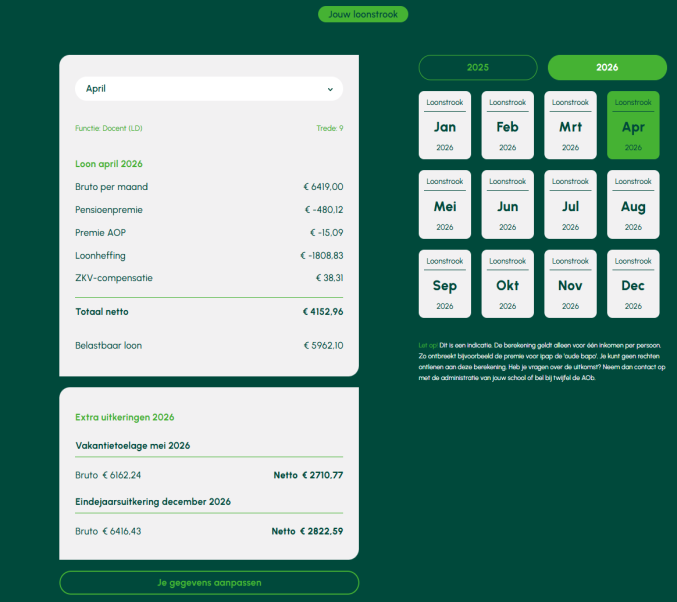
After entering the information, you will see an overview that looks like your actual payslip. You will see your gross salary, pension contributions, income tax, and your net income per month. The Salary Check also displays other amounts, such as holiday pay and an end-of-year bonus.

AOb Salary check - screenshot of the tool's result page

On the Salary Check results page, you can see your salary and possible benefits.

4. Check your own payslip

It never hurts. Grab your own payslip and compare the amounts with the result of the Salary Check. Are your gross salary, pension contributions, and payroll tax correct? And does your net salary match? This way, you can quickly find out if you are receiving what you are entitled to. 

However: the tool provides an indication. Do the amounts on your payslip differ from the amounts in the Salary Check? You can in various ways to contact us.

5. Calculate your scenario

You can use the Salary Check to verify your payslip. But also to calculate scenarios. What if you move up a pay scale? And what if you start working a few hours more or less? Adjust it and see what it means for your gross and net salary according to your education collective labour agreement.

6. The Salary Check in MyAOb

Do you want to calculate your salary again later? The Salary Check is ready for you in MyAOb, below Self-serviceJust like many other useful links and tools.

Four tiles: Start the salary check, Go directly to AOb Legal, Member benefits, Help with tax returns


Frequently asked questions about the Salary Check

Do you work in the primary education (PO), secondary education (vo) of secondary vocational education (MBO)If so, the Salary Check for your position has been updated with the data from the current collective labor agreement.

The Salary Check provides an indication based on the most recent collective labor agreement stipulations, tax rates, and pension contributions. In practice, your payslip may differ slightly, for example due to allowances, deductions, or a different pension scheme. Use the tool as a guideline, not as an exact calculation.

Your salary scale and step are listed on your payslip or in your employment contract. Can't figure it out? Ask your employer's HR department.

Yes. If a new collective labor agreement has been reached, we update the data in the Salarischeck as soon as possible. We also update the tax rates and pension contributions every year.

All the benefits of the AOb

  • Free advice and legal assistance
  • Vote on the collective labor agreements and other agreements
  • Free inspiring workshops
  • Free tax service
  • The Education magazine in the bus

You are already a member from € 10,02 net per month

(You can reclaim 40% of your union dues through your employer)

This page was translated automatically, if you see strange translations please let us know